
This page provides details and instructions on how to purchase a Community Parking Permit (CPP) for the UC San Diego campus.
Community Parking Permit Information
- Cost: $30
- Validity: 30 consecutive days from the permit's start date
- Purchase: Can be purchased in advance through the UCSD Parking Portal. An account is required.
- Where and when you can park:
| Parking Space | Weekdays | Weekends |
|---|---|---|
| S Spaces | 3 p.m. - 7:30 a.m. | All day |
| B Spaces | 4 p.m. - 7:30 a.m. | All day |
| A Spaces (Not valid in A spaces marked "A permit required 24 hours a day/7 days a week.") | 4 p.m. - 7:30 a.m. | All day |
How to Purchase a Community Parking Permit
Please follow the instructions below in order to create an account and buy a Community Parking Permit.
1) Select "Guest Login" and "Register" to create an account. This requires your email, a password, and your name.

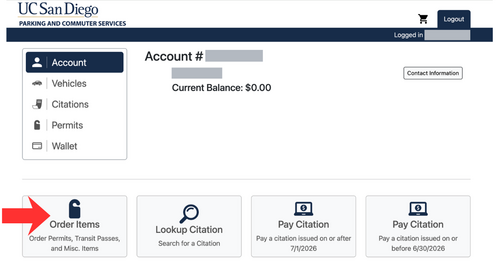
2) After you create an account, on the home page select “Order Items.”
3) Select the correct permit:
- 30 Day Permits
- Community 30 Day Permit
- Select a start date for the permit. Permit expires 30 days after the selection start date.

4) Fill out your vehicle information.
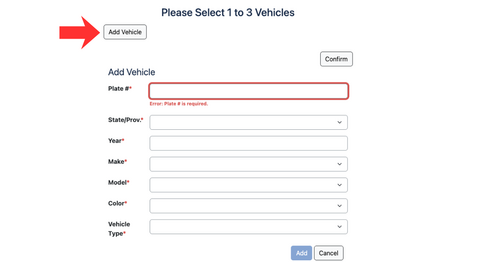
5) Confirm that the permit is the 30 day period you selected and your vehicle information is correct.

6) To check out, please fill out your billing and credit card information. After that is completed, press the checkout button.


7) After paying for your permit, you will receive a receipt. You do not need to print or display the permit on your vehicle as your license plate will verify your parking credentials.
